In this article i am explained how we can implement the jQuery lightbox in our site.This is very easy to implement follow the instruction below step by step
jQuery scripts used in your projects. Simple show(), hide() will make this ready to use jQuery Lightbox. It’s simple and free download and easy to integrate in your projects. Below code will explain you how to make this simple jquery lightbox.
Step 1 Create a file called index.aspx
Step 2 create a file called style.css:
Output as shown below at run time

Click on show lightbox link then lightbox popup is shown as below
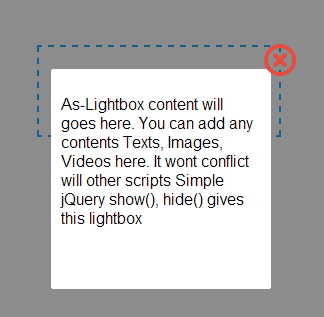

jQuery scripts used in your projects. Simple show(), hide() will make this ready to use jQuery Lightbox. It’s simple and free download and easy to integrate in your projects. Below code will explain you how to make this simple jquery lightbox.
Step 1 Create a file called index.aspx
<%@ Page Language="C#" AutoEventWireup="true" CodeFile="index.aspx.cs" Inherits="index" %>
<!DOCTYPE html PUBLIC "-//W3C//DTD XHTML 1.0 Transitional//EN" "http://www.w3.org/TR/xhtml1/DTD/xhtml1-transitional.dtd">
<html xmlns="http://www.w3.org/1999/xhtml">
<head runat="server">
<title>Ligh Box(http://dotnethubs.blogspot.in) </title>
<link rel="stylesheet" type="text/css" href="css/style.css" />
<script type="text/javascript" src="js/jquery-1.9.1.js"></script>
<script type="text/javascript">
function load_as_lightbox() {
var DocumentHeight = $(document).height();
$('.as_lightbox_wrapper').css('height', DocumentHeight); // Set document height for As_Lightbox wrapper
}
function ShowLightBox(DivId) {
$('.as_lightbox_wrapper').show(); // Show the wrapper
$('#' + DivId + '').show('slow'); // Show the Lightbox div, you can use another jQuery view functions such as fadeIn, fadeToggle for animations
}
function HideLightBox(DivId) {
$('.as_lightbox_wrapper').hide('slow'); // Hide the As_Lightbox wrapper
$('#' + DivId + '').hide(); // Hide the div
}
$(document).ready(function () {
load_as_lightbox(); // call this function after document loads
$('#Show_Lightbox').click(function () {
ShowLightBox('Simple_Lightbox'); // call the As_Lightbox show function
return false;
});
$('#as_lightbox_close').click(function () {
HideLightBox('Simple_Lightbox'); // call the As_Lightbox close function
return false;
});
});
</script>
<style type="text/css">
.as_wrapper{
font-family:Arial;
color:#333;
font-size:14px;
padding:20px;
border:2px dashed #17A3F7;
width:200px;
margin:0 auto;
margin-top:50px;
}
</style>
</head>
<body>
<form id="form1" runat="server">
<!-- AS_lightbox div (division) starts -->
<div class="as_lightbox_wrapper"></div> <!-- As_lightbox wrapper (half transparent background) -->
<div class="as_lightbox_container" id="Simple_Lightbox"> <!-- Set ID As_Lightbox here -->
<div class="as_lightbox">
<div class="as_lightbox_close" id="as_lightbox_close">
<img src="images/close_flat_icon.png" alt="Close Lightbox" title="Close" />
</div> <!-- As_Lightbox close icon -->
<div class="as_clear"></div>
<!-- As_Lightbox contents will starts here-->
<p>As-Lightbox content will goes here. You can add any contents Texts, Images, Videos here. It wont conflict will other scripts Simple jQuery show(), hide() gives this lightbox</p>
<!-- As_Lightbox contents ends here -->
</div>
</div>
<!-- AS_lightbox div (division) Ends -->
<div class="as_wrapper">
<br/><br/>
<center>
<a id="Show_Lightbox" class="as_a">Show Lightbox</a>
</center>
</div>
</form>
</body>
</html>
<!DOCTYPE html PUBLIC "-//W3C//DTD XHTML 1.0 Transitional//EN" "http://www.w3.org/TR/xhtml1/DTD/xhtml1-transitional.dtd">
<html xmlns="http://www.w3.org/1999/xhtml">
<head runat="server">
<title>Ligh Box(http://dotnethubs.blogspot.in) </title>
<link rel="stylesheet" type="text/css" href="css/style.css" />
<script type="text/javascript" src="js/jquery-1.9.1.js"></script>
<script type="text/javascript">
function load_as_lightbox() {
var DocumentHeight = $(document).height();
$('.as_lightbox_wrapper').css('height', DocumentHeight); // Set document height for As_Lightbox wrapper
}
function ShowLightBox(DivId) {
$('.as_lightbox_wrapper').show(); // Show the wrapper
$('#' + DivId + '').show('slow'); // Show the Lightbox div, you can use another jQuery view functions such as fadeIn, fadeToggle for animations
}
function HideLightBox(DivId) {
$('.as_lightbox_wrapper').hide('slow'); // Hide the As_Lightbox wrapper
$('#' + DivId + '').hide(); // Hide the div
}
$(document).ready(function () {
load_as_lightbox(); // call this function after document loads
$('#Show_Lightbox').click(function () {
ShowLightBox('Simple_Lightbox'); // call the As_Lightbox show function
return false;
});
$('#as_lightbox_close').click(function () {
HideLightBox('Simple_Lightbox'); // call the As_Lightbox close function
return false;
});
});
</script>
<style type="text/css">
.as_wrapper{
font-family:Arial;
color:#333;
font-size:14px;
padding:20px;
border:2px dashed #17A3F7;
width:200px;
margin:0 auto;
margin-top:50px;
}
</style>
</head>
<body>
<form id="form1" runat="server">
<!-- AS_lightbox div (division) starts -->
<div class="as_lightbox_wrapper"></div> <!-- As_lightbox wrapper (half transparent background) -->
<div class="as_lightbox_container" id="Simple_Lightbox"> <!-- Set ID As_Lightbox here -->
<div class="as_lightbox">
<div class="as_lightbox_close" id="as_lightbox_close">
<img src="images/close_flat_icon.png" alt="Close Lightbox" title="Close" />
</div> <!-- As_Lightbox close icon -->
<div class="as_clear"></div>
<!-- As_Lightbox contents will starts here-->
<p>As-Lightbox content will goes here. You can add any contents Texts, Images, Videos here. It wont conflict will other scripts Simple jQuery show(), hide() gives this lightbox</p>
<!-- As_Lightbox contents ends here -->
</div>
</div>
<!-- AS_lightbox div (division) Ends -->
<div class="as_wrapper">
<br/><br/>
<center>
<a id="Show_Lightbox" class="as_a">Show Lightbox</a>
</center>
</div>
</form>
</body>
</html>
Step 2 create a file called style.css:
body{
margin:0;
padding:0;
font-family:Arial;
}
.as_clear{
clear:both;
}
.as_a{
text-decoration:underline;
color:#17A3F7;
cursor:pointer;
}
.as_lightbox_wrapper{
width:100%;
position:absolute;
top:0;
left:0;
z-index:100;
background:url(../images/as_popup_wrapper_bg.png);
display:none;
}
.as_lightbox_close{
position:absolute;
right:0;
z-index:102;
height:32px;
width:32px;
top:-25px;
right:-25px;
cursor:pointer;
}
.as_lightbox_container{
z-index:101;
position:fixed;
width:200px;
height:200px;
background:#FFF;
left:31%;
top:13%;
padding:10px;
border-radius:2px;
display:none;
}
margin:0;
padding:0;
font-family:Arial;
}
.as_clear{
clear:both;
}
.as_a{
text-decoration:underline;
color:#17A3F7;
cursor:pointer;
}
.as_lightbox_wrapper{
width:100%;
position:absolute;
top:0;
left:0;
z-index:100;
background:url(../images/as_popup_wrapper_bg.png);
display:none;
}
.as_lightbox_close{
position:absolute;
right:0;
z-index:102;
height:32px;
width:32px;
top:-25px;
right:-25px;
cursor:pointer;
}
.as_lightbox_container{
z-index:101;
position:fixed;
width:200px;
height:200px;
background:#FFF;
left:31%;
top:13%;
padding:10px;
border-radius:2px;
display:none;
}
Output as shown below at run time
Download sample code attached


