blogspot visit counter

Friday, 23 May 2014

Delegate in c#

Delegate in c#
Delegate :- Delegates in C# are objects which points towards a function which matches its signature. Delegates are reference type used to encapsulate a method with a specific signature. Delegates are similar to function pointers in C++; however, delegates are type safe and secure.
Features of delegate

    A delegate represents a class.
    delegate is type-safe.
    We can use delegates both for static and instance methods
    We can combine multiple delegates into a single delegate.
    Delegates are often used in event-based programming, such as


Saturday, 17 May 2014

Asp dotnet interview questions and answers for experienced

MVC asp.net interview questions and answers
Categories:- MVC asp.net interview questions and answers , What are the core components of .NET framework , Difference between ienumerable and iqueryable in asp.net , Interview-questions-and-answers-2 years experience

If you are prepare for Interview then, this set of questions would be add some questions related to Asp.net view state(state management) in your brain Smile . So lets check your knowledge about view state.

1). What is View State in Asp.net?

Ans: View state is nothing but a method that the ASP.NET use to preserve page and control values between postbacks. When the HTML markup for the page is rendered, the current state of the page and values that must be retained during postback are serialized into base64-encoded strings. This information is then put into the view state hidden field.

2). View state is client-side or server side state management techenique?

Ans: View state is client-side state management techenique

3). What are the client-side state management techenique supported by ASP.NET?

Ans: View state
Control state
Hidden fields
Cookies
Query strings

Friday, 16 May 2014

Modifier in c#

MVC asp.net interview questions and answers
    1) Abstract
    2) Sealed
    3) Virtual
    4) Const
    5) Event
    6) Extern
    7) Override
   8)  Readonly
    9) Static
    10) New

Difference between ienumerable and iqueryable in asp.net

MVC asp.net interview questions and answers
Difference b/w IEnumerable and IQuerable

IEnumerable and IQuerable are used to query data from database and collections.  The IEnumerable is basically inherited from IQueryable, so it’s having all the features of the IQueryable in addition to its having additional own features.

Wcf interview questions and answers for experienced

Wcf interview questions and answers for experienced
Categories :-MVC asp.net interview questions and answers , Latest asp.net interview questions and answers for experienced , ADO.Net Interview Questions and Answers  .

 What is WCF?

Ans.  WCF provides a runtime environment for services, enabling you to expose CLR types as services, and to consume other services as CLR types.WCF is part of .NET 3.0 and requires .NET 2.0, so it can only run on systems that support it

Tuesday, 13 May 2014

MVC asp.net interview questions and answers

MVC asp.net interview questions and answers
Categories :- Assembly in asp.net , Role of CLR framework , Latest asp.net interview questions and answers for experienced

 About ASP.Net MVC?

The ASP.Net MVC is the framework provided by Microsoft that lets you develop the applications that follows the principles of Model-View-Controller (MVC) design pattern. The .Net programmers new to MVC thinks that it is similar to WebForms Model (Normal ASP.Net), but it is far different from the WebForms programming.
This article will tell you how to quick learn the basics of MVC along with some frequently asked interview questions and answers on ASP.Net MVC

1. What is ASP.Net MVC?

The ASP.Net MVC is the framework provided by Microsoft to achieve     separation of concerns that leads to easy maintainability of the     application.
Model is supposed to handle data related activity
View deals with user interface related work
Controller is meant for managing the application flow by communicating between Model and View.

Tuesday, 6 May 2014

Jquery ui calendar control

Simple Drop Down Menu with Jquery and CSSu
Categories :- Jquery,Simple Drop Down Menu with Jquery and CSS

Introduction:-  In my previous article i have explained Simple Drop Down Menu with Jquery and CSS.
 In this article i am explain how we can use datetime picker in our project using asp.net.

Description:- article related to jQuery.Now in this article i am explain how to show JQuery UI Calenar control.

Monday, 5 May 2014

Simple Drop Down Menu with Jquery and CSS using asp.net

Simple Drop Down Menu with Jquery and CSSu
Categories :- Drop down menu using jquery,JQuery Dropdown  Menu,JQuery Restrict to Allow Only Numbers in Textbox in Asp.net,JQuery Menu In aspdot

Introduction :- Show/hide menu on hover/mouseout using JQuery.

Detail :- In my previous article  show  drop-down  menu using JQuery.

Sunday, 13 April 2014

jQuery Menu

jQuery Menu
Categories :- Drop down menu using jquery,JQuery Mneu,JQuery Restrict to Allow Only Numbers in Textbox in Asp.net

Introduction :-  In this article i am explain how i can design header using jquery in asp.net.

Description :-  In my previous article i have explained  how we can create  jquery lightbox in asp.net .Now i have explained how we can make a stylish menu using jquery in asp.net as shown below.


Step 1 :-  Create a new asp.net website.
Step 2 :-  Write Click on Project explorer and add new item in your project and give a name to the asp.net web page.
Step 3 :-   Write a code as shown below in .aspx page.
<html xmlns="http://www.w3.org/1999/xhtml">
<head runat="server">
    <title>jQuery menu</title>
     <script src="http://code.jquery.com/jquery-1.8.2.js" type="text/javascript"></script>
<script type="text/javascript" src="http://dev.css-zibaldone.com/js/jquery/plugins/jquery.easing.js"></script>
     <script type="text/javascript">
         $(function () {
             $('li', '#navigation').each(function () {
                 var $li = $(this);
                 var $a = $('a', $li);
                 $a.hover(function () {
                     $a.stop(true, true).animate({
                         height: '3em',
                         lineHeight: '3em',
                         bottom: '1em'
                     }, 'slow', 'easeOutBounce');
                 }, function () {
                     $a.stop(true, true).animate({
                         height: '2em',
                         lineHeight: '2em',
                         bottom: 0
                     }, 'slow', 'easeOutBounce');
                 });
             });
         });
</script>
<style type="text/css">
#form1 #navigation {
height: 4em;
margin: 0;
padding: 0 1em;
list-style: none;
border-bottom: 2px solid #0270BF;
}
#form1 #navigation li {
height: 100%;
float: left;
margin-right: 0.5em;
}
#form1 #navigation a {
float: left;
height: 2em;
padding: 0 1em;
background: #0270BF;
color: #fff;
line-height: 2;
text-transform: uppercase;
font-weight: bold;
text-decoration: none;
margin: 2em 0 0 0;
letter-spacing: 0.1em;
position: relative;
}
#form1 #navigation a:hover {
background: #F86000;
}
</style>
</head>
<body>
    <form id="form1" runat="server">
    <div>
     <ul id="navigation">
<li><a href="#">Home</a></li>
<li><a href="#">About us</a></li>
<li><a href="#">Contact</a></li>
<li><a href="#">Product List</a></li>
<li><a href="#">Carrer</a></li>

</ul>
    </div>
    </form>
</body>
</html>

Output as shown below

Download sample code attached

 aspdotnet stylish menu_2 with example


Friday, 4 April 2014

Jquery Menu Animation in Asp.net

c# .net interview question answers
Categories :-What is JQuery  , Different between Jquery and javascript , JQuery get user ip address , Jquery example using asp.net

Introduction :- In this article i am explained how to create a animated menu in asp.net. This is very nice and easy article for design a animation in menu.

Tuesday, 1 April 2014

How to change package name in android eclipse

How to change package name in android eclipse
I have an Android project created in eclipse.I want to modify the package name and application of the project.How to do that in eclipse?

Step 1  :-  Open eclipse  IDE and

Thursday, 20 March 2014

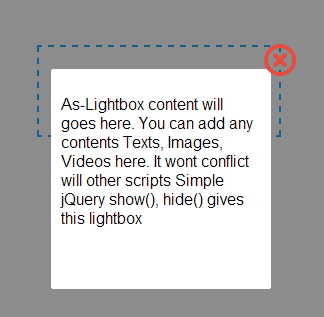
jquery lightbox in asp.net

jquery lightbox in asp.net
In this article i am explained  how we can implement the jQuery lightbox in our site.This is very easy to implement follow the instruction below step by step 

 jQuery scripts used in your projects. Simple show(), hide() will make this ready to use jQuery Lightbox. It’s simple and free download and easy to integrate in your projects. Below code will explain you how to make this simple jquery lightbox.


Step 1 Create a file called index.aspx

  <%@ Page Language="C#" AutoEventWireup="true" CodeFile="index.aspx.cs" Inherits="index" %>

<!DOCTYPE html PUBLIC "-//W3C//DTD XHTML 1.0 Transitional//EN" "http://www.w3.org/TR/xhtml1/DTD/xhtml1-transitional.dtd">

<html xmlns="http://www.w3.org/1999/xhtml">
<head runat="server">
    <title>Ligh Box(http://dotnethubs.blogspot.in) </title>

    <link rel="stylesheet" type="text/css" href="css/style.css" />
<script type="text/javascript" src="js/jquery-1.9.1.js"></script>
<script type="text/javascript">
    function load_as_lightbox() {
        var DocumentHeight = $(document).height();
        $('.as_lightbox_wrapper').css('height', DocumentHeight); // Set document height for As_Lightbox wrapper
    }
    function ShowLightBox(DivId) {
        $('.as_lightbox_wrapper').show(); // Show the wrapper
        $('#' + DivId + '').show('slow'); // Show the Lightbox div, you can use another jQuery view functions such as fadeIn, fadeToggle for animations
    }
    function HideLightBox(DivId) {
        $('.as_lightbox_wrapper').hide('slow'); // Hide the As_Lightbox wrapper
        $('#' + DivId + '').hide(); // Hide the div
    }
    $(document).ready(function () {
        load_as_lightbox(); // call this function after document loads
        $('#Show_Lightbox').click(function () {
            ShowLightBox('Simple_Lightbox'); // call the As_Lightbox show function
            return false;
        });
        $('#as_lightbox_close').click(function () {
            HideLightBox('Simple_Lightbox'); // call the As_Lightbox close function
            return false;
        });
    });
</script>
<style type="text/css">
.as_wrapper{
    font-family:Arial;
    color:#333;
    font-size:14px;
    padding:20px;
    border:2px dashed #17A3F7;
    width:200px;
    margin:0 auto;
    margin-top:50px;
}
</style>
</head>
<body>
    <form id="form1" runat="server">
    <!-- AS_lightbox div (division) starts -->
<div class="as_lightbox_wrapper"></div> <!-- As_lightbox wrapper (half transparent background) -->
<div class="as_lightbox_container" id="Simple_Lightbox"> <!-- Set ID As_Lightbox here -->
    <div class="as_lightbox">
        <div class="as_lightbox_close" id="as_lightbox_close">
            <img src="images/close_flat_icon.png" alt="Close Lightbox" title="Close" />
        </div> <!-- As_Lightbox close icon -->
        <div class="as_clear"></div>
        <!-- As_Lightbox contents will starts here-->
        <p>As-Lightbox content will goes here. You can add any contents Texts, Images, Videos here. It wont conflict will other scripts Simple jQuery show(), hide() gives this lightbox</p>
        <!-- As_Lightbox contents ends here -->
    </div>
</div>
<!-- AS_lightbox div (division) Ends -->
<div class="as_wrapper">


<br/><br/>
<center>
<a id="Show_Lightbox" class="as_a">Show Lightbox</a>
</center>
</div>
    </form>
</body>
</html>

Step 2 create a file called style.css:

body{
    margin:0;
    padding:0;
    font-family:Arial;
}
.as_clear{
    clear:both;
}
.as_a{
    text-decoration:underline;
    color:#17A3F7;
    cursor:pointer;
}
.as_lightbox_wrapper{
    width:100%;
    position:absolute;
    top:0;
    left:0;
    z-index:100;
    background:url(../images/as_popup_wrapper_bg.png);
    display:none;
}
.as_lightbox_close{
    position:absolute;
    right:0;
    z-index:102;
    height:32px;
    width:32px;
    top:-25px;
    right:-25px;
    cursor:pointer;
}
.as_lightbox_container{
    z-index:101;
    position:fixed;
    width:200px;
    height:200px;
    background:#FFF;
    left:31%;
    top:13%;
    padding:10px;
    border-radius:2px;
    display:none;
}

Output as shown below at run time

 Click on show lightbox link then lightbox popup is shown as below


Download sample code attached

 Jquery LightBox


Sunday, 9 March 2014

What is cts?

What is cts? in asp.net

CTC -: Cts is the component of clr through which net framework provides support for multiple languge because it contains a type system that is comman acroos all languge . two cts compliant languges do not requier type conversion when calling the code written in one languge from with in code written in anthore languge CTS provides a ease set of data type for all the languge supported by NET. frame work this means that the size of integer and long varibles is the same across all NET.compliant programng languges however each languge uses alliases for the base data type provide by CTS.for example , CTS uses the data type system .int32 to represent a 4 byte integer value; however visul basic uses the alias integer for the same whereasC# uses the alias int. this is done for the sake of clarity and simplicity.


What is cls?
Ans -:common languge specifiction (CLS) ia a set of basic rules, which enable interoperabillity between two.NET-compliant languages supported by CLS can use each other's class libaries similar to their own. application programming interfaces which are designed by following the rules defined in CLS

Friday, 29 November 2013

Role of CLR in Dotnet Framework

Role of CLR in Dotnet Framework Interview Question
1 ) CLR Provides an environment to execute .Net Applications on target machines.

2) CLR is also a common runtime environment  for all .NET code irrespective  of their programming language, because the compilers of .NET framework convert every source code into a common language known a MSIL
3) CLR also provide various services to execute processes, such as memory management service and security services, CLR performs various tasks to manage the execution process of .NET application.

The list of CLR as shown below.....

Automatics memory management  -> CLR invokes various built-in-functions of .NET framework to allocate and de- allocate the memory of .NRT object.

Garbage Collection -> Garbage Collection is the major role of CLR, which prevents memory leaks during execution of program. The Garbage collector of CLR automatically determines the best time to free the memory, which is reserved by an object for execution .

Code Access Security  -> Code Access Security(CAS) model is used in .NET framework to impose restrictions and security during execution of programs.

Code Verification -> CLR enforces type safety and prevents a source code from performing illegal operations, such as accessing invalid memory location.

JIT compilation of .NET code -> CLR uses the services of the just-in-time(JIT) compiler to load MSIL code on traget machine for execution.

Monday, 28 October 2013

Json with integer in php

Json with integer in php
Introduction :-
Here i am explain how to use  PHP  json_encode function.

In some cases numeric data may  appear as numeric strings, for example 1 as "1". While consuming the json data on a client app that would mean an extra parsing to get for example an int from the string.

The solution is to simply use an extra option (JSON_NUMERIC_CHECK) on the json_encode function call:

then you will not get the data in string format.You get the data like 1 without double quotes

use for json_encode


<?php echo json_encode($data, JSON_NUMERIC_CHECK); ?>

For example

{"data":[{"x":0,"y":0,"username":"%s","gender":"%s","location":"%s","id":"%s","age":30},{"x":0,"y":0,"username":"Ranvijay Singh","gender":"male","location":"Navi Mumbai (New Mumbai), India","id":1179445904,"age":30},{"x":10,"y":20,"username":"aman","gender":"male","location":"indore","id":123,"age":30}]}


Here x and y is integer values then not show double quotes

Thursday, 24 October 2013

How to Change Table Name in MySQL

Introduction :-
If you want to change the Table name without loss you data then it's very simple to change the table in MySQL database and sql server database.

Description : -

To change the name of an existing table first to second, use this command as shown below


RENAME TABLE first TO second;

For Example

You have table name like stodent_tab
and there are four fields like First_name,Last_Name,Stud_ID,Stud_Batch
and you want to change the name of  stodent_tab because you have done mistake in student_tab name

So Query Like This


RENAME TABLE stodent_tab TO student_tab;

Note -: This query is same if you want to use the sql server database.

Monday, 21 October 2013

What are the core components of .NET framework

What are the core components of .NET framework

Categories :- Benefits of net framework ,  HR interview question and answer , 1-year-exp-asp.net interview question and answer , Interview questions and answers for 2 years , C# interview Question And Answer

 The Two Components of .NET Framework are
 1) Common Language Run time [CLR]
2)  .Net Framework class Library

 Other key components of .NET Framework:

NET Framework Class Library

  3)   Dynamic Language Runtimes (DLR)
   4 ) Application Domains
   5)  Runtime Host
   6)  Common Type System
   7)  Metadata and Self-Describing Components
    8) Cross-Language Interoperability
    9) NET Framework Security
    10) Profiling
    Side-by-Side Execution

Briefly describe MSIL

.Net Framework is shipped with compilers of all programming languages to develop programs. There are separate compilers for the visual basic,C#, and visual c++ programming languages in .Net Framework.Each .Net compiler produces code after compiling the source code. The intermediate code is common for all languages and is understandable only to .NET environment. This intermediate is know as MSIL.

MSIL file is executable file that can transferred various machines. Therefore, it is said that MSIL file are portable to nay machine.

Monday, 14 October 2013

What are the benefits of net framework

What are the benefits of net framework
.Net framework offers many benefits to application developers.some of this benefits are as follow :

 1) Consistent programming model :- 
 Dot net framework provide consistent object oriented  programming model across various language.You can use the model  to create a program s for performing different task, such as connecting to and retrieving data from database and reading from and writing to files.

Saturday, 12 October 2013

How to get xml data into grid view in asp.net

How to get xml data into grid view
Introduction :- In this article i have explain how to show XML file data in asp.net grid-view .

Description :- In  my previous post i have explained How to Generating XML file From MySQL database 
Create and read XML file in asp.net , Read data from XML file in asp.net , now i have explain how to show XML file data in grid view  using   asp.net

Step 1 :- Create a new asp.net web site.
Step 2:- Add a new page in your project and give the name to the page gridxml.aspx..
Step 3 :- Add  one xml file and write something like this which you want to show on gridview page of asp.net as show below.

Note  - This is a Employees.xml file already exist in your project.


<?xml version="1.0" standalone="yes"?>
<Employees>
  <Employee>
    <EmployeeID>Chitranjan</EmployeeID>
    <CompanyName>abc informatics</CompanyName>
    <ContactName>chintu </ContactName>
    <ContactTitle>Developer</ContactTitle>
    <Address>ganraj</Address>
    <City>Indore</City>
    <PostalCode>452001</PostalCode>
    <Country>India</Country>
    <Phone>00000000</Phone>
    <Fax>4545499</Fax>
  </Employee>
  <Employee>
    <EmployeeID>Aman</EmployeeID>
    <CompanyName>Y N Info</CompanyName>
    <ContactName>Aman</ContactName>
    <ContactTitle>Artiest</ContactTitle>
    <Address>Boriwali east</Address>
    <City>Pune</City>
    <PostalCode>3436</PostalCode>
    <Country>India</Country>
    <Phone>9549544345</Phone>
    <Fax>559935</Fax>
  </Employee>
  <Employee>
    <EmployeeID>Rahul</EmployeeID>
    <CompanyName>Gold Main</CompanyName>
    <ContactName>Hot</ContactName>
    <ContactTitle>Designer</ContactTitle>
    <Address>dfdf</Address>
    <City>bBombay</City>
    <PostalCode>5434546</PostalCode>
    <Country>India</Country>
    <Phone>54545</Phone>
  </Employee>
  <Employee>
    <EmployeeID>Ronak</EmployeeID>
    <CompanyName>Yeswant Niwas</CompanyName>
    <ContactName>Golo</ContactName>
    <ContactTitle>Producer</ContactTitle>
    <Address>345 Alock Nagar</Address>
    <City>Bhopal</City>
    <PostalCode>554677</PostalCode>
    <Country>India</Country>
    <Phone>5656</Phone>
    <Fax>0909ASD</Fax>
  </Employee>
  <Employee>
    <EmployeeID>Ravi</EmployeeID>
    <CompanyName>DFF</CompanyName>
    <ContactName>LJ</ContactName>
    <ContactTitle>PPOIU</ContactTitle>
    <Address>79879 JKJK</Address>
    <City>ABC</City>
    <PostalCode>6656DF</PostalCode>
    <Country>RFF</Country>
    <Phone>54554FGGG</Phone>
    <Fax>GGG555</Fax>
  </Employee>
  <Employee>
    <EmployeeID>JJ8</EmployeeID>
    <CompanyName>HJKGJ8</CompanyName>
    <ContactName>GGH55</ContactName>
    <ContactTitle>New Dehli</ContactTitle>
    <Address>Rambag</Address>
    <City>ASD</City>
    <PostalCode>87GG</PostalCode>
    <Country>India</Country>
    <Phone>7667654</Phone>
    <Fax>FGH45</Fax>
  </Employee>
  <Employee>
    <EmployeeID>Sumit</EmployeeID>
    <CompanyName>Sumo tech</CompanyName>
    <ContactName>Sumo</ContactName>
    <ContactTitle>Manager</ContactTitle>
    <Address>656 FFH</Address>
    <City>Strasbourg</City>
    <PostalCode>8788</PostalCode>
    <Country>Noida</Country>
    <Phone>665-778-545</Phone>
    <Fax>545.54.55</Fax>
  </Employee>
 
</Employees>

 Step 4 :- open the gridxml.aspx file and write the code as show below.


using System;
using System.Collections.Generic;
using System.Linq;
using System.Web;
using System.Web.UI;
using System.Web.UI.WebControls;
using System.Data;

public partial class CS : System.Web.UI.Page
{
    protected void Page_Load(object sender, EventArgs e)
    {
        if (!this.IsPostBack)
        {
            this.BindGrid();
        }
    }

    private void BindGrid()
    {
        using (DataSet ds = new DataSet())
        {
            ds.ReadXml(Server.MapPath("~/Employees.xml"));
            GridView1.DataSource = ds;
            GridView1.DataBind();
        }
    }

    protected void OnPageIndexChanging(object sender, GridViewPageEventArgs e)
    {
        GridView1.PageIndex = e.NewPageIndex;
        this.BindGrid();
    }
}

Note -: Source code also available in vb.net

Download sample code attached


Related Posts Plugin for WordPress, Blogger...