blogspot visit counter

Thursday, 4 April 2013

c# .net interview question answers

c# .net interview question answers
What is C#?

C# is an object oriented, type safe and managed language that is compiled by .Net framework to generate Microsoft Intermediate Language.  
  • C# is a new object-oriented language from Microsoft that is currently used for application development on the .NET platform.
  • It exhibits features found in languages such as C++, Java, Smalltalk, and Perl, among others.
  • C# has been submitted to the standards body.

What is the difference between abstract classes and interface?

Abstract class can have concrete methods while interfaces have no methods implemented.
Interfaces do not come in inheriting chain, while abstract classes come inheritance.

 What are the types of comment in C# with examples?
Single line
Eg:
   //This is a Single line comment
ii. Multiple line (/* */)
Eg: /* my name is chitranjan*/

What is the difference between public, static and void?
All these are access modifiers in C#.
Public:- Public declared variables or methods are accessible anywhere in the application.
Static:-  Static declared variables or methods are globally accessible without creating an instance of the class. The compiler stores the address of the method as the entry point and uses this information to begin execution before any objects are created.
Void:- Void is a type modifier that states that the method or variable does not return any value.

What are the namespaces used in C#.NET?
    Namespace is a logical grouping of class.
  • using System;
  • using System.Collections.Generic;
  • using System.Windows.Forms;

What is an object?
An object is an instance of a class through which we access the methods of that class. “New” keyword is used to create an object. A class that creates an object in memory will contain the information about the methods, variables and behavior of that class.

What are the characteristics of C#?
    There are several characteristics of C# are :
  • Simple
  • Type safe
  • Flexible
  • Object oriented
  • Compatible
  • Consistent
  • Interoperable
  • Modern
What are the basic concepts of object oriented programming?
    It is necessary to understand some of the concepts used extensively in object oriented programming.These include
  • Objects
  • Classes
  • Data abstraction and encapsulation
  • Inheritance
  • Polymorphism
  • Dynamic Binding
  • Message passing.

What is an object? 
An object is an instance of a class through which we access the methods of that class. “New” keyword is used to create an object. A class that creates an object in memory will contain the information about the methods, variables and behavior of that class.

What is the difference between Object and Instance?
An instance of a user-defined type is called an object. We can instantiate many objects from one class.
An object is an instance of a class.

Define Constructors?  
A constructor is a member function in a class that has the same name as its class. The constructor is automatically invoked whenever an object class is created. It constructs the values of data members while initializing the class.
 

Wednesday, 3 April 2013

How to Prepare Yourself for the Interview

How to Prepare Yourself for the Interview

How to Prepare Yourself for the Interview


I would like to provide you some of the valuable tips that have been researched and may work wonder for you.
Following are the things you must be prepared about:
1)    Things to be prepared before interview
  • Firstly analyze and re-read the job requirement detail and description and specification as well as nature of job. Match up the skills and knowledge you possess and the position you are interviewing for.
  • Searching and collecting vital information about the company would surely work in favor of you. The better you can present your insights about the company, the more you can get your employer impressed.
  • Expect some of the questions that would possibly be asked and accordingly prepare all the answers highlighting all your accomplishments, knowledge and skills through certain practical examples.
  • Finding out the name as well as title of the interviewer followed by time and place is vitally important for you. And practice again and again.

2)    During the interview
  • You must arrive 10-15 minutes earlier than normal schedule of interview.
  • Choose out matching clothes and dress up professionally.
  • On meeting the person interviewing you, make sure to maintain your eye contact, give warm smile and shake your hands firmly.
  • Never forget to carry your portfolio such as (copies of your résumé, transcripts, references, etc.)…
  • Show your positivity and enthusiasm because these are the qualities that are often sought by employers when it comes to determining suitability of any candidate for the post applied.
  • Maintain confidence and time while answering the questions asked.
  • Never forget to thank the employer after concluding the interview and firmly shake your hands and say good bye while leaving.

jquery form validation in asp.net

jquery form validation in asp.net

Introduction:

Validation is an important requirement in every enterprise application and every platform has its own implementation to this regards. In this article, I will illustrate how to implement client-side validation in ASP.NET using jQuery.

Description:


Now let's open the Visual Studio.NET and create a Web project for the example. Then add a new Web form for the user to enter some data below


Download the .js file and add you project in Scripts folder
Download Link is :Js Files
OR
Direct include the file like this
<script type="text/javascript" src="http://ajax.googleapis.com/ajax/libs/jquery/1.3.2/jquery.min.js"></script>
  <script type="text/javascript" src="http://ajax.microsoft.com/ajax/jquery.validate/1.5.5/jquery.validate.min.js"></script>


Jquery code for form validation as shown below


<head runat="server">
  <title></title>
  <link href="StyleSheet.css" rel="stylesheet" type="text/css" />
  <script type="text/javascript" src="Scripts/JScript.js"></script>
  <script type="text/javascript" src="Scripts/JScript2.js"></script>
  <script type="text/javascript">
    $(document).ready(function () {
      // Initialize validation on the entire ASP.NET form
      $("#form1").validate({
     
        onsubmit: false
      });

      $("#Order").click(function (evt) {
   
        var isValid = $("#form1").valid();

     
        if (!isValid)
          evt.preventDefault();
      });
    });
  </script>
</head>

.aspx from code as shown below


<form id="form1" runat="server">
    &nbsp;

  <fieldset id="BillingInfo">
    <legend>New User Registration</legend>

    <label for="FirstName">First Name:</label>
    <asp:TextBox runat="server" ID="FirstName" CssClass="required" />
 
    <label for="LastName">Last Name:</label>
    <asp:TextBox runat="server" ID="LastName" CssClass="required" />
 
    <label for="Address">Address:</label>
    <asp:TextBox runat="server" ID="Address" CssClass="required" />
 
    <label for="City">City:</label>
    <asp:TextBox runat="server" ID="City" CssClass="required" />
 
    <label for="State">State:</label>
    <asp:TextBox runat="server" ID="State" CssClass="required" />
 
    <label for="Zip">Zip:</label>
    <asp:TextBox runat="server" ID="Zip" CssClass="required digits" />
 
    <asp:Button runat="server" ID="Order" Text="Submit " />
  </fieldset>
</form>

Full Image of Aspx Page Jquery and html code as show below


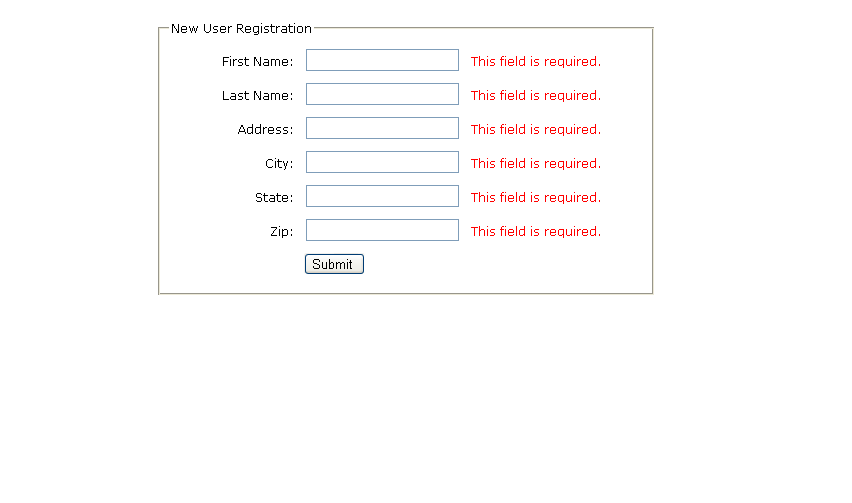
Output At the run time as shown below :- Click on Button then  get the jquery validation error corresponding to text box

2 : -Jquery Form Validation With Asp.Net With Source Code
In this example i will  explain how i can validated to email and text box using  jquery

Full Example as Show Below only Copy and Past this Code in our Page


<html xmlns="http://www.w3.org/1999/xhtml">
<head runat="server">
    <title>Jquery from validation</title>
    <script src="http://code.jquery.com/jquery-latest.js"></script>
  <script type="text/javascript" src="http://jzaefferer.github.com/jquery-validation/jquery.validate.js"></script>
<style type="text/css">
* { font-family: Verdana; font-size: 96%; }
label { width: 10em; float: left; }
label.error { float: none; color: red; padding-left: .5em; vertical-align: top; }
p { clear: both; }
.submit { margin-left: 12em; }
em { font-weight: bold; padding-right: 1em; vertical-align: top; }
</style>
 <script>
      $(document).ready(function () {
          $("#commentForm").validate();
      });
  </script>

</head>
<body>
    <form  class="cmxform" id="commentForm" method="get" action="" runat="server">
    <fieldset>
   <legend>A simple comment form with submit validation and default messages</legend>
   <p>
     <label for="cname">Name</label>
     <em>*</em><input id="cname" name="name" size="25" class="required" minlength="2" />
   </p>
   <p>
     <label for="cemail">E-Mail</label>
     <em>*</em><input id="cemail" name="email" size="25"  class="required email" />
   </p>
   <p>
     <label for="curl">URL</label>
     <em>  </em><input id="curl" name="url" size="25"  class="url" value="" />
   </p>
   <p>
     <label for="ccomment">Your comment</label>
     <em>*</em><textarea id="ccomment" name="comment" cols="22"  class="required"></textarea>
   </p>
   <p>
     <input class="submit" type="submit" value="Submit"/>
   </p>
 </fieldset>
    </form>
</body>
</html>

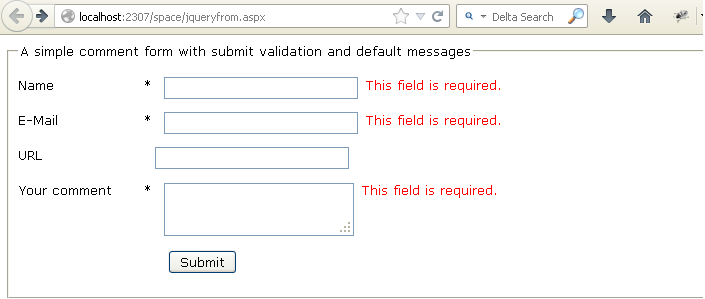
Screen Short As Shown Below


Download sample code attached


Tuesday, 2 April 2013

how to count number of button clicks in asp.net

how to count number of button clicks in asp.net ?
Introduction:
Here, we will see how to check number of click on button click by the user.When user click on the button automatically increment by one.
Description:
In this article how i can count the user click on button .its a static counter when user refresh the page the counter start from zero. in my previous article i have explained how i can count the total click by the user on button click and display the result in text box.

Html file code as  shown below

Its a simple javascripts code for generate the number on button click by the user

<script type="text/javascript">
    var index = 0;

    function increment(var1) {
        index++;
        if (var1 == 1)
        { document.getElementById('button1').value = index; }
        else
        { document.getElementById('button2').value = index; }

    }
</script>
calling the javascript funtion on button click and display the total click by the user

<form id="form" runat="server">
    <div>
    <input type="button" id="button1" onclick="increment(0)" value="increment"/>
    <input type="button" id="button2" onclick="increment(1)" value="increment again"/>
    </div>
    </form>

Image for show all the complete code as show below
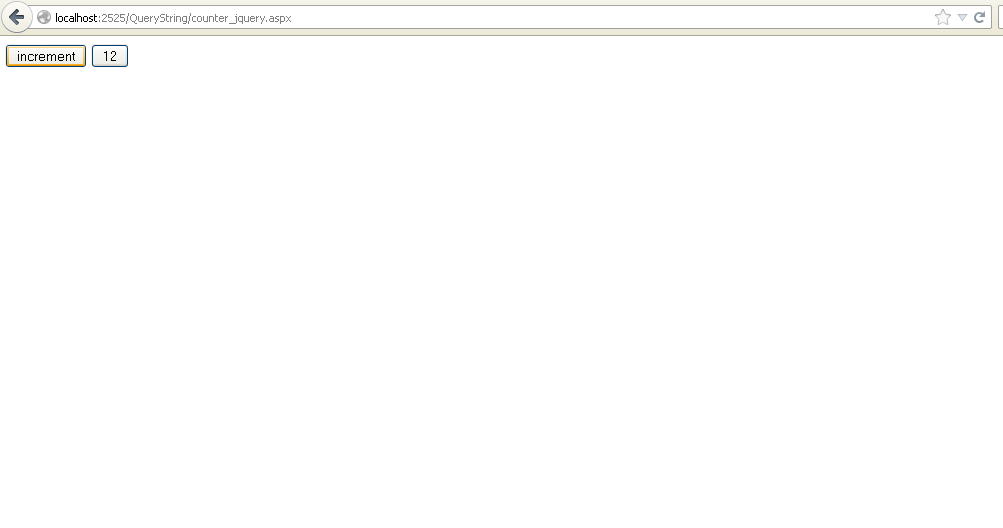
Example show below


Download sample code attached

Monday, 1 April 2013

Count the number of times a submit button has been clicked

Count the number of times a submit button has been clicked

Count the number of times a submit button has been clicked

Introduction
  How i can find the user click on submit button in multipal time

GUI Html Code As Shown Below

<%@ Page Language="C#" AutoEventWireup="true" CodeFile="counter.aspx.cs" Inherits="counter" %>

<!DOCTYPE html PUBLIC "-//W3C//DTD XHTML 1.0 Transitional//EN" "http://www.w3.org/TR/xhtml1/DTD/xhtml1-transitional.dtd">

<html xmlns="http://www.w3.org/1999/xhtml">
<head runat="server">
    <title></title>
</head>
<body>
    <form id="form1" runat="server">
    <div>
  
        <asp:Button ID="Button1" runat="server" onclick="Button1_Click"
            Text="counter" />
&nbsp; Show Total Click of Particular User
        <asp:TextBox ID="TextBox1" runat="server"></asp:TextBox>
  
    </div>
    </form>
</body>
</html>

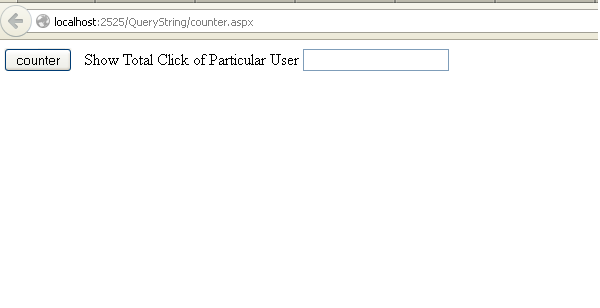
From Image as shown below
On Button Click Couter Code Behind 
static int count = 0; 
protected void Button1_Click(object sender, EventArgs e)
    {
        count++;
        int totalcount = count;
        TextBox1.Text = totalcount.ToString();
    }

Output as shown below

Download sample code attached


------------------------------------------------------------------------------------------------------------------------
How to count character of TextBox in ASP.NET
Introduction:
In this article i will count the how many character in text box enter by the user.
Description: 
In my previous article i have explained how i can count the total no of click on button by the user. and another article i have explained and provide the full source code for display the total click by the user on button in text box.
Here, we will see how to check number of character has been inserted in the TextBox. A TextBox Which has max length 120 character and we insert a character in TextBox max length will bedisplay 119 characters. When We enter 120 characters in the TextBox that will be the Max length. Drag and drop a TextBox on the page. Select TextBox and press F4 to property window.

Code For java Scripts as shown below

<style type="text/css">

        .valid

        {
    background-color: #FFFFFF;
            color: #000000;
        }   
        .invalid
        {
            background-color: #FFCCCC;
            color: #ff0000;
        }
    </style>
    <script type="text/javascript">
        function textCounter1(field, maxlimit)
         {
             if (field.value.length > maxlimit)
           {
                field.value = field.value.substring(0, maxlimit);
                document.getElementById('message').className = "invalid";
                document.getElementById('message').focus();
            }
            else
                {
                document.getElementById('message').className = "valid";

                }
        }

        function textCounter(field, countfield, maxlimit) {

            if (field.value.length > maxlimit) // if too long then trim it!
                field.value = field.value.substring(0, maxlimit);
            else
                countfield.value = maxlimit - field.value.length;
        }

    </script>

From Html Code Shown Below 

<form  id="form" runat="server">
    <div style="text-align: center">
    <asp:TextBox ID="message" runat="server" name="message" onkeydown="textCounter(this.form.message,this.form.remLen,120)"

        onkeyup="textCounter1(this.form.message, 120)" class="validentry"

        Height="101px" TextMode="MultiLine" Width="228px"></asp:TextBox>

    <br />
    <input name="remLen" size="5" maxlength="5" value="120" />Character is remaing
  
    </div>
    </form>


Output windows as shown below

Download sample code attached


Simple difference between String and StringBuilder asp.net

Simple difference between String and StringBuilder asp.net

Simple difference between String and StringBuilder asp.net

The main difference beween string and stringbuilder is that when we are copying two string in the case of string concatination is done means that one string is attached to another string and attaced string is deleted, and one new memory allocation is done.it takes lot of time and this is time taking process.


but in case of stringbuilder copying two stings means string1 is appended to string2 or vice versa.no memory allocation and deletion of string.So it is very efficient process and it takes less time.

Difference Between String and String
String


1.Its a class used to handle strings.
2.Here concatenation is used to combine two strings.
3.String object is used to concatenate two strings.
4.The first string is combined to the other string by creating a new copy in the memory as a string object, and then the old
string is deleted
5.That is why  "Strings are immutable".
6. Slower

String Builder
1.This is also the class used to handle strings.
2.Here Append method is used.
3.Here, Stringbuilder object is used.
4.Insertion is done on the existing string.
5.Usage of StringBuilder is more efficient in case large amounts of string manipulations have to be performed.
6. Faster

class
Program{static void Main(string[] args){
//for example:

string str = "hello"; //Creates a new object when we concatenate any other words along with str variable it does not actually modify the str variable, instead it creates a whole new string.
str = str + " to all";Console.WriteLine(str);StringBuilder s = new StringBuilder("Hi");s.Append(" To All");Console.WriteLine(s);Console.Read();}
}

query string in asp.net

query string in asp.net

Introduction:

The QueryString collection is used to retrieve the variable values in the HTTP query string.
The HTTP query string is specified by the values following the question mark (?),
 like this:
http://localhost:2525/QueryString/getquerystring.aspx?name=rahul&password=123.
 Query strings are included in bookmarks and in URLs that you pass in an e-mail. They are the only way to save a page state when copying and pasting a URL.

Description:


Now I have one page which contains one textbox and button control I need to send textbox value to another page when we click on button control for that we need to write the code like this
protected void Button1_Click(object sender, EventArgs e)
{
Response.Redirect("getquerystring.aspx?name="+this.txt_nm.Text);
}
Or
In case if we need to send multiple parameters to another page we need to write code like this
protected void btnSend_Click(object sender, EventArgs e)
{
Response.Redirect("getquerystring.aspx?name="+this.txt_nm.Text+"&password="+this.txt_pass.Text);
}
Now we need to get these values in another page (here I mentioned Default2.aspx) by using QueryString Parameter values with variable names or index values that would be like this
protected void Page_Load(object sender, EventArgs e)
{

string name = Request.QueryString["name"];
string password = Request.QueryString["password"];

}

first create new website and open Default.aspx page and write the following code
<html xmlns="http://www.w3.org/1999/xhtml">
<head runat="server">
<title>QueryString Example in asp.net</title>
</head>
<body>
<form id="form1" runat="server">
<div><b>QueryString Example</b></div><br />
<div>
<table>
<tr>
<td><b>Enter the Name:</b></td>
<td><asp:TextBox ID="txt_nm" runat="server"/></td>
</tr>
<tr>
<td><b>Enter the Password</b></td>
<td><asp:TextBox ID="txt_pass" runat="server"/></td>
</tr>
<tr>
<td></td>
<td><asp:Button ID="Button1" runat="server" onclick="Button1_Click"/></td>
</tr>
</table>
</div>
</form>
</body>
</html>
After that write the following code in code behind
protected void btnSend_Click(object sender, EventArgs e)
{
Response.Redirect("getquerystring.aspx?name="+txt_nm.Text+"&pasword="+txt_pass.Text);
}
Now Right click on your website and Add New item and add new page (getquerystring.aspx) open that getquerystring.aspx page and write the following code
On  code behind
protected void Page_Load(object sender, EventArgs e)
{

 string name = Request.QueryString["name"];
 string password = Request.QueryString["password"];
Response.Write("name=" + name + "\t" + "password=" + pasword);
}

Example


Download sample code attached


Related Posts Plugin for WordPress, Blogger...